

How Images Sell: 6 Psychological Principles for Your Online Store
When shopping online, the first few seconds are decisive. Good copy matters, but it’s the visuals that determine whether customers will remember your product, trust it, and click “Add to cart.”
Today, thanks to artificial intelligence, you no longer need expensive photo shoots. With AI you can generate professional product photos, contextual visualizations, and marketing banners in a fraction of the time.
We’ve summarized 6 well-known psychological principles you can use in your online store. Each is illustrated with an example, a practical solution, and ways AI can help you apply it.
1. Images stay in memory longer than text
Psychologist Allan Paivio showed that three days after exposure, people remember up to 65% of images but only 10% of text. This phenomenon, known as the Picture Superiority Effect, demonstrates that visuals are far more effective for recall than words.
Solution: Pair product descriptions with visuals that instantly anchor the product in memory.
Example: A color code like “RAL 5002” won’t stick in a customer’s mind. A visualization of a bedroom painted in this exact shade, however, creates an emotion and makes the choice easier. That’s exactly what we applied at xFarby.sk, where AI generates realistic interior previews in specific colors. Customers can imagine the shade in a real space and remember it more clearly.

2. High-quality visuals increase perceived product value
The principle known as Polish Bias states that aesthetically pleasing visuals increase trust in a product. Research by Tractinsky (2000) confirmed that visual quality directly impacts perceived functionality—what looks good is more likely to be believed to work well.
Solution: A polished product photo feels more trustworthy and increases the willingness to buy.
Example:
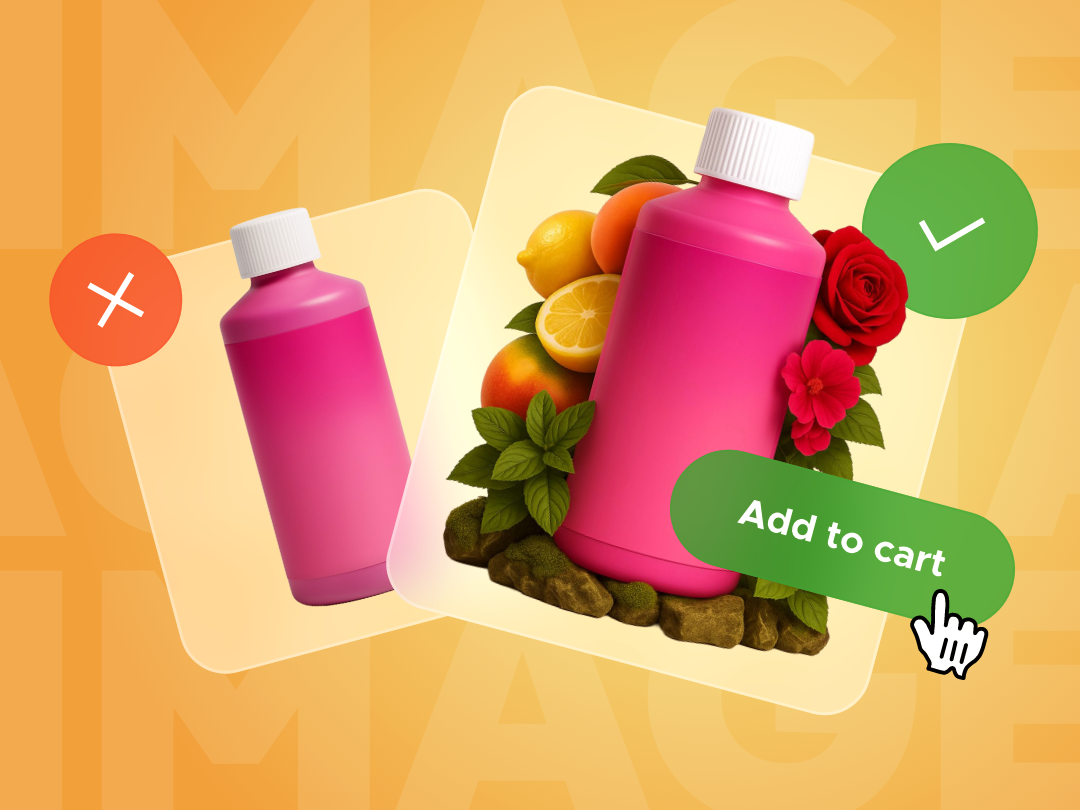
- Before: a quick snapshot taken on a desk with a mobile phone.
- After: AI removes the background and places the item in a studio or lifestyle setting—suddenly it looks premium.


3. Too many similar images overwhelm customers
Psychologist George A. Miller found that our short-term memory can only hold about 7 (±2) distinct elements at once. This is known as Miller’s Law. If visuals are too similar, the brain starts merging, ignoring, or getting lost in them—creating “visual noise.”
Solution: Focus on quality over quantity.
Example: Instead of many nearly identical product shots, show 4–5 distinctive angles—a front view, a side view, a material close-up, and a lifestyle or outfit context. This gives customers a complete mental picture and makes the decision easier.


4. A single exposure is not enough
The Mere Exposure Effect, identified by psychologist Robert Zajonc (1968), shows that the more often we see something, the more positive our attitude toward it becomes. Repetition builds trust, which is key for conversions.
Solution: Show your key products multiple times and in different contexts, so customers remember them better.
Example: Products you want to prioritize should appear repeatedly—on the product page, in the homepage banner, on Instagram, in newsletters, and in retargeting ads. Each touchpoint strengthens memory and lowers the effort needed to decide.
AI in action: A single high-quality product photo is enough for AI tools to automatically create banners, newsletter visuals, and social posts—without manual graphic work.


5. Distinctiveness increases memorability
The Von Restorff Effect shows that an element which stands out from its surroundings is more likely to be noticed and remembered. If everything looks the same, nothing stands out.
Solution: Use contrast to highlight products you want to emphasize. Different colors, compositions, backgrounds, or lighting can create a “scroll-stopping” effect and direct attention exactly where you want it.
Example: In a jewelry gallery on a white background, one striking hero shot—on dark stone or modeled on a person—can increase interest and perceived value. With AI, you can create such visuals without organizing a photo shoot.
Tip: Consider using a short video or motion graphic. Dynamic formats naturally attract attention and increase the time customers spend engaging with a product.

6. Emotion sells, not description
Psychologists found that when people reach an insight themselves, they experience a Eureka moment—a sudden flash of understanding that activates the brain’s reward center.
If you show a product in a familiar or meaningful context, customers can not only imagine it better but also connect with it emotionally. This leads to stronger recall and a higher likelihood of purchase.
Solution: Instead of a plain description, use visuals that tell a story.
Example: Instead of claiming “a fresh fragrance with notes of mint, rose, and citrus,” show the bottle surrounded by herbs, citrus, and flowers on a wet stone. Customers will instantly imagine the scent—and that’s what makes them remember it.


Conclusion
Images are not just decoration—they are a psychological tool. They build trust, strengthen recall, and influence purchasing decisions. The good news is that today you have tools that make this easier than ever.
If you want stronger visuals, greater trust, and higher conversions, you don’t need an expensive redesign. Start by optimizing your product gallery with these 6 principles.
And if you’re not sure where to begin, reach out to us. We’ll show you how to apply these psychological effects in your online store.
Sources:
- Sarah Hart Creative – Visual Dark Arts
- Paivio, A. (1971) – Imagery and Verbal Processes
- Medina, J. (2014) – Brain Rules
- Tractinsky, N., Katz, A. S., & Ikar, D. (2000) – What is beautiful is usable
- Miller, G. A. (1956) – The Magical Number Seven, Plus or Minus Two
- Zajonc, R. B. (1968) – Attitudinal effects of mere exposure
- Von Restorff, H. (1933) – Über die Wirkung von Bereichsbildungen im Spurenfeld
- All images generated via ChatGPT, ver. 4o
FAQ: How to Apply Image Psychology and AI in Your Online Store
Why use AI for product photos if I already have images?
AI can turn existing shots into consistent backgrounds, contextual scenes, and ready-to-use variations for banners, newsletters, or social posts. It saves design time and keeps a unified visual standard across channels.
What’s the minimum set of product images without overwhelming customers?
Four to five distinct shots are enough: front, side, material/detail, size comparison, and one lifestyle or “hero” visual. Less clutter, faster decisions (Miller’s Law).
What is the “Picture Superiority Effect” in practice?
People remember images far better than text. Pair each key benefit with a clear image (a color in an interior, a material macro) and the product will be remembered longer than if described in text only.
Do prettier visuals really improve conversions, or just brand ego?
Aesthetics increase perceived trust and value (“what is beautiful is usable”). Better photos reduce doubts and hesitation—often reflected in higher CTR and conversions at the same price point.
How many times should a product appear to leverage the Mere Exposure Effect?
Think in terms of 3+ touchpoints: product gallery, homepage banner or category page, social media, and newsletters. The key is consistent but not identical exposure—different contexts strengthen recall and trust.
How can I apply the Von Restorff Effect without breaking brand identity?
Use contrast within your palette—darker/lighter backgrounds, standout composition, unique angle, or subtle animation. Make the hero shot an exception, not chaos—the rest should stay clean and consistent.
Is it legal to use AI-generated images in e-commerce?
Generally yes, but follow the tool’s licensing, avoid protected logos/designs, and don’t mimic existing brands. For human images, handle consent/model releases properly. Keep internal records of your visual sources.
Will AI-generated backgrounds slow down my site?
No, if optimized correctly: use WebP/AVIF formats, reasonable sizes, lazy-load galleries, and CDN delivery. Export banners in two sizes (mobile/desktop) and use srcset for responsive loading.
Can this scale if I have hundreds of products?
Yes. Prepare scene templates (backgrounds, angles, lighting) and set up a batch pipeline: remove background → place in scene → export presets for banners/newsletters/IG. AI handles bulk processing consistently.
How do I measure whether visual improvements worked?
Run A/B tests on product and category pages: track CTR on galleries, time on page, scroll depth, add-to-cart rate, conversions, and returns. Also monitor engagement in emails and social posts with identical offers.
Do visuals affect SEO or just UX?
Both. Alt text, file names, and gallery structure support SEO. High-quality, fast-loading visuals reduce bounce and improve Core Web Vitals—which indirectly boosts organic traffic and conversions.
What kind of “story” should I use for products with intangible benefits (like scents or colors)?
Show context that triggers associations: a color in a real room, a scent through natural ingredients, a fabric close-up plus a lifestyle scene. Let the image create emotion and understanding without lengthy copy.
Can I mix real photos with AI-generated scenes?
Yes, if you maintain a consistent style (lighting, perspective, color grading). The result should not feel fake. In sensitive categories (food, pharma), stay transparent and don’t present unrealistic benefits.
Where should I start if I don’t want a full redesign?
Start with the product gallery of your bestsellers: clean up backgrounds, add a hero context, limit redundant angles, and unify dimensions. Then create AI-based templates for banners and newsletters using the same source photos.